Automating SME work and infrastructure with ADKPart 10 of 11
Keeping Year-End Operations Running: Backup and Restore Verification with ADK
Prepare year-end backup and restore checks with ADK: agree on RTO and RPO, rehearse isolated restores, verify order integrity, and assign approval and holiday handoffs.

In this article
What you will learn
Separate backup, restore actions, and verified business resumption.
Separate daily checks from approved restoration.
Reconcile restored older records with current external state.
Year-end practice series, part 2; article 10 overall | Verify saving, restoration, and business resumption separately. Technical information verified as of October 14, 2026.
A backup dashboard says last night's operation succeeded. Does that mean work can resume if order data becomes corrupted during the holiday closure? You still need to establish the recoverable data point, restoration destination, connection permissions, reconciliation of orders and warehouse transfers, and the person who makes decisions during the closure.
Year-end preparation should distinguish backup completion, restore-operation completion, and verification that the business can use the result. An ADK agent can organize check results and procedures and hand unverified items to someone. Design restoration as a separate process approved after its target and impact have been reviewed.
We continue with Company A, the fictional equipment and parts distributor with 35 employees. One person combines internal IT and infrastructure responsibilities, supported by a sales manager and an external maintenance provider. Times, counts, objectives, and procedures are illustrative assumptions. Actual checks and recovery results for year-end 2026 had not been observed as of the verification date. This article proposes preparation beforehand.
This is the second of three year-end practice articles following the eight-part foundation series. It makes backup and restore checks concrete, applying the earlier roles and approval design to a period when responsibility changes hands.
1. Separate Documented Capabilities from What Needs Testing
Cloud SQL provides on-demand and scheduled backups. Retention and configuration conditions depend on the selected backup option, among other factors. Cloud SQL backup overview
Google Cloud's recovery-testing guidance recommends checking data integrity, RTO, and RPO, and testing the application stack with restored data. Official recovery-testing guidance
These sources help distinguish a saving capability from verification that business operations can resume. Published procedures and samples are different from evidence that a Japanese SME automated restoration with ADK and achieved results. The workflow here is our proposed application of the published material.
The service and existing procedures perform the actual backup and restoration. Design the agent to organize results, show evidence, and hand work to people. A generated report must not be displayed as a completed restoration.
2. Map What Must Return for Orders to Resume
Assume Company A keeps its authoritative order records in Cloud SQL, stores attachments separately, and transfers orders from its portal to the warehouse. Break “order database backup” into the elements needed for the business.
Element: Order database
Check after restoration: Order IDs, acceptance states, and line items match
Owner: IT and sales
Element: Attachments
Check after restoration: Ledger references match the documents
Owner: Business owner
Element: Application
Check after restoration: Version and settings can handle the restored data
Owner: Maintenance provider and IT
Element: Connectivity and authentication
Check after restoration: Authorized connection paths work
Owner: IT and substitute owner
Element: Warehouse integration
Check after restoration: Sent, unsent, and resubmission handling are understood
Owner: Sales and warehouse
Restoring a database can leave missing attachments, incompatible settings, or repeated warehouse submissions. The business owner defines what must be available to resume orders, and IT maps that to backup and restoration scope.
Document exclusions too. If old temporary analytical data can be regenerated, state the conditions and owner. Knowing what was not saved narrows the search during recovery. Legal retention and storage requirements remain matters to check for the particular business and contracts.
3. Agree on RTO and RPO with Business and IT Owners
RTO is the maximum acceptable offline time; RPO expresses the acceptable time window of potential data loss. Google Cloud's planning guidance derives these objectives from business impact. Disaster recovery planning guide
At Company A, sales and warehouse representatives explain which shipments are affected by unavailable ordering and which period of orders could be reentered after checking originals. IT and the provider compare approaches based on backup methods, restoration steps, human verification, and cost.
For comparison with the RTO, measure recovery from the start of the service outage through approval, restoration, connectivity, and ledger reconciliation to verified business resumption. Record response time since detection as a separate indicator. If the outage start is unknown, mark RTO achievement as unverified. Restore-job runtime alone does not establish that the whole business met its objective. Agree on fixed start and end points.
For RPO, verify the point through which restored data includes business activity. Do not substitute backup completion time for the order-data point. Record the objective separately from the point actually verified in a rehearsal.
The company sets the time objectives; observations establish whether they can be met. A particular product alone does not guarantee a uniform RTO or RPO. Data volume, dependencies, and holiday staffing also matter. Begin with the necessary business activity.
4. Start Daily Checks with Bounded Metadata
A checking agent does not need every order record. Initially retrieve backup IDs, start and completion times, state, scope, accessible storage references, and rehearsal records for authorized services. Limit the time window, record count, and query duration.
Attach environment and target IDs to retrieval results so a test database's success cannot be mixed into production checks. Return insufficient permission, unreachable networks, retrieval failure, and not-yet-updated state separately from health. AI must not fill gaps from earlier conversation.
Suppose an illustrative backup finishes at 1:20 a.m., and its business-data point is verified as 1:00 a.m. Display both. Where subsequent orders remain is a separate check. These times are hypothetical, not typical Cloud SQL processing durations.
The checking flow reviews the target list, obtains necessary information, validates timestamps and gaps in code, lets AI explain, and confirms human receipt. Use company-defined rules for freshness and failure. Link detailed originals for authorized reviewers.
5. Make Unverified Items and the Next Owner Visible
Separate backup results from restoration verification in the report. The following structure helps a reader assess current state:
Retrieved facts: Backup ID, status, retrieval time, and covered data point.
Restoration checks: Rehearsal date, destination, verified items, and unverified items.
Possible impact: Potential deviation from objectives and supporting evidence.
Next action: Who checks which original by when.
Handoff: Primary owner, substitute, receipt, and next report time.
ADK Artifacts can manage versioned report files, but its in-memory implementation does not retain them after process termination. ADK: Artifacts
Define report storage, viewers, retention, and the handoff register operationally. Saving a report file is different from backing up the order database. Do not make an agent's conversation history the authoritative order record or the only restoration record.
6. Test the Substitute Owner's Access and Connections Before Closure
The substitute may not be able to read every screen the usual owner can. Company A checks, using the substitute's own authentication, access to results, runbooks, the operation register, and provider contacts. Do not substitute shared credentials from the primary owner.
Test reachability from the devices and connection paths used during the closure. If material is accessible only on an internal network, credentials expire, or the provider has connection requirements, establish contacts and renewal methods in advance. Observe failures in the checking system itself so it can report unavailable retrieval.
Separate reading checks from executing restoration. A substitute who reads status need not be able to restore arbitrary databases or increase permissions. Limit the executing person or job to approved targets and operations.
Communications include receipt and next-check time. Sending a provider request does not establish that it accepted ownership. Verify holiday coverage against contracts and agreements, and decide the company's response if contacts are unavailable.
7. Plan Rehearsals on Targets Separate from Production
Cloud SQL's documented procedures support restoring to a new instance. They also state that restoration to the same or an existing instance overwrites its current data. Official restoration destination guidance
For initial rehearsals, use an authorized destination separate from production. Record its ID, source, data point, restoration scope, viewers, cost, and post-rehearsal handling. Verify that paths to production customer notifications and warehouse updates cannot run from the rehearsal environment.
- The business owner chooses the rehearsal scope and business checks.
- IT checks the backup ID, destination, and dependent settings.
- The approver reviews plan version, targets, expected impact, and timing.
- Start the authorized restoration job and record its external execution ID.
- Query state and confirm completion before reconciling data.
- Use the isolated application to verify order viewing and business procedures.
- The business owner receives verified coverage and unresolved items.
Rehearsal data may contain customer information. Limit viewers and extractable content and avoid passing unnecessary data to AI. Assign an owner and deadline for handling the environment and materials afterwards.
8. Separate Daily Checks from Approved Restoration Jobs
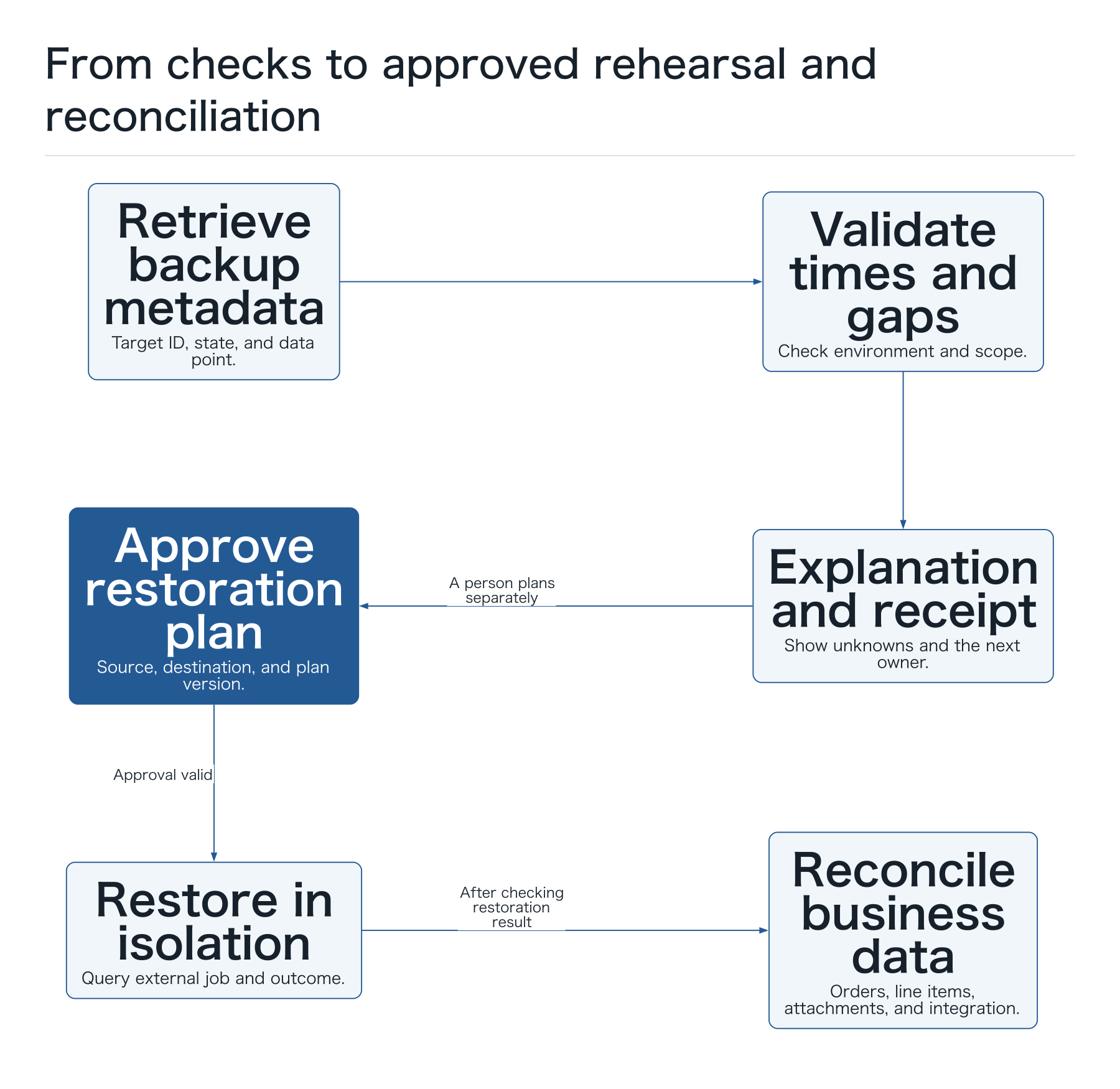
When a daily checking agent detects an issue, hand status and evidence to someone. Do not have it immediately restore data. Company A's restoration plan includes an incident or rehearsal ID, source ID, destination ID, plan version, approver, and expiry.
The approver sees the data point to return to, changes that may be lost, inconsistencies with external integrations, verification items, and stop conditions. If targets or points change after approval, require renewed review. An urgent conversation does not expand scope.
The restoration tool validates permitted source-destination combinations. It does not execute against a similarly named database or another customer's target supplied in free text. Switching production connections is a separate approval and verification step from isolated rehearsals or the restoration operation.
Hand long work to an existing job or execution platform, then let the agent retrieve state. Keep a register that shows external progress and ownership even if the chat display is interrupted.
 Open full-size diagram
9. Avoid Repeated Restoration on Retries or Unknown Outcomes
Cloud Run jobs guidance recommends idempotent processing and progress records to prevent duplicate or corrupted outputs on retries. Job retries and checkpoints
Assign one unique operation ID to each approved action and track not started, running, succeeded, failed, and outcome unknown in the register. Use conditional registration updates, for example, to prevent two people or redelivered requests from starting the same operation together.
The register and external execution are separate systems. A unique key alone does not guarantee one external restoration. Reconcile the execution ID and target state. If a response disappears, query status before blindly resending an operation that may still be running.
Bound attempts, intervals, and overall waiting time even for temporary read failures. Stop for insufficient permission, expired approval, or target mismatch. Hand an uncertain outcome to a person and record who checks next.
Give checks, restoration, and business reconciliation their own IDs. A repeated check must not create a new restore request, and the register should distinguish resuming only post-restoration verification.
10. Check Data Integrity and Success-Rate Denominators
A successful restoration job still leaves business relationships to verify. Company A checks unique order IDs, order-to-line-item relationships, totals, attachment references, and warehouse transfer states. Record reference data and its point in time in the plan.
If only selected orders were reviewed, display the sample coverage separately from full reconciliation. Matching counts can still conceal duplicates and omitted orders, so check business identifiers and relationships as well.
For rehearsal success rates, use planned rehearsals as the denominator and rehearsals with all required restoration and business checks completed as the numerator. Do not remove unstarted, failed, or unknown cases to improve the rate. For a hypothetical plan of five, with three complete, one unstarted, and one unknown, completion is three of five, not three of three.
An overall rate must not conceal an unverified critical order database. For each target, show the data point, measured recovery interval, required items, gaps, and reviewer. The business owner judges the objective using evidence for that coverage.
Checking a Warehouse-State Mismatch
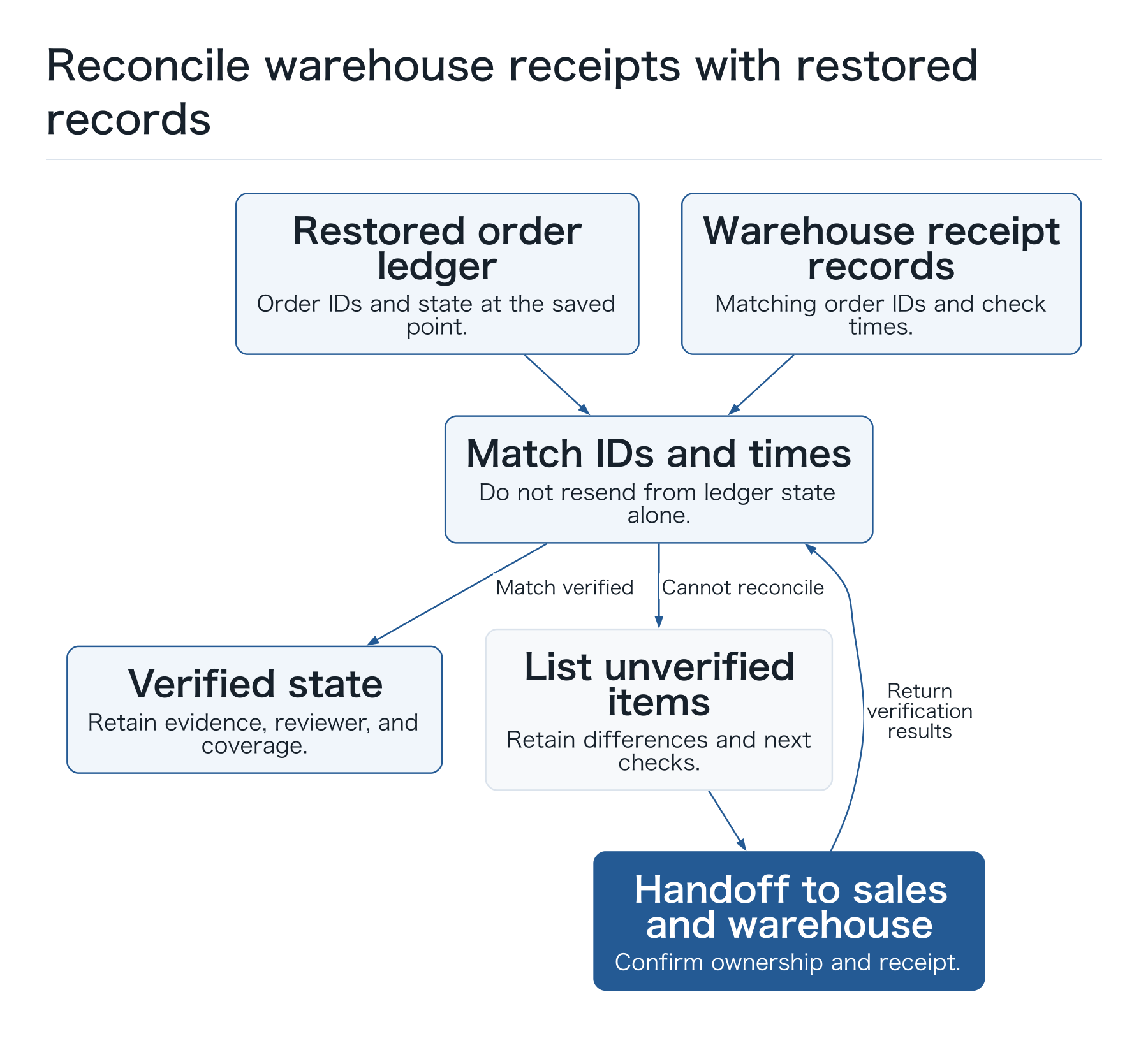
Suppose the restored order ledger says “not sent” while the warehouse says “received.” Before resending based on the ledger alone, map the order ID, external receipt record, and verification time. Put orders that cannot be reconciled into the unknown-outcome list for warehouse and sales owners. An older restored state must not be mistaken for the external system's current state.
For attachments, check that a reference leads to the right order's document and required version, not merely that it opens. Design reconciliation using identifiers or human verification where possible without passing entire confidential contents to AI. If data points differ, retain difference checks as post-restoration work. Assign ownership before closing the rehearsal.
 Open full-size diagram
11. Rehearse Failure Cases Before Closure
Restoring one good backup does not evaluate holiday handoffs. Prepare test cases such as:
- Current backup information cannot be retrieved because permissions are insufficient.
- Saving completed, but the business-data point remains unverified.
- The substitute's connection path cannot reach original records.
- The approved destination differs from the target immediately before execution.
- A repeated operation ID could trigger a second start.
- An external job response disappears and progress is unknown.
- Restoration succeeds, but attachment or warehouse reconciliation remains incomplete.
Verify expected stopping, status queries, deferral, and human receipt for each. More than an AI statement of health, evaluate whether gaps were correctly shown and handed to the next task. Assess generated prose, retrieved evidence, code decisions, and business results separately.
Where a rehearsal reveals incomplete procedures, assign an owner and deadline for repair. Recheck the same case and share remaining conditions before closure. Judge results from performed work rather than anticipating year-end outcomes.
12. Define Handoffs Before, During, and After Closure
Before closure, check target lists, objectives, recent backups, rehearsals, and contacts. Simulate the primary owner's absence and verify that the substitute can read reports, access originals, and contact the approver. Separate provider coverage from company business decisions.
During closure, run checks under agreed frequency and ownership. Inspect not only service issues but also checks that did not run, retrieval failures, and reports not received. Record contacts and next update times when necessary work is blocked.
Before reopening, organize unfinished backups and checks, restored environments, deferred operations, and remaining order and warehouse work. Close holiday cases after confirming receipt by the normal working-day owner. A generated AI report does not complete a handoff.
These stages are a design example to adapt to the company's closure schedule. They do not presume unconditional holiday coverage by one person. Agree on a workable arrangement, including substitutes, external support, and narrower service scope.
13. Your Backup and Restoration Verification Worksheet
- Business to protect: Ordering, shipping, or inquiries that must resume.
- Backup scope: Databases, attachments, settings, dependencies, and exclusions.
- RTO and RPO: Objectives, measurement start and end, and responsible business owner.
- Daily checks: Target IDs, windows, limits, retrieval times, and missing-data labels.
- Rehearsal: Source, isolated destination, checks, cost, and post-rehearsal handling.
- Permissions and connectivity: Reads, restoration, substitutes, and holiday access paths.
- Approval: Operation ID, plan version, data point, approver, and expiry.
- Execution management: External execution ID, states, retries, and unknown-outcome queries.
- Integrity: References and coverage for orders, line items, attachments, and integration states.
- Handoff: Primary and substitute owners, provider, receipt, and next update.
- Continuation: Unfinished rehearsals, remaining work, repair owners, and recheck deadlines.
Ask someone other than the usual owner to read the worksheet. If they can explain what data returns, what remains unverified, and which actions can be approved, gaps become easier to identify. Treat missing information as work for an owner to verify rather than leaving it to model judgment.
To organize year-end checks and restoration preparation, share the target task, backup method, current restoration procedure, and holiday contacts with KONDAX. A concrete design connects evidence that data was saved to verification that business operations can resume.
Three checks before practice
- Can the substitute reach original records with their own permissions?
- Can outage start and verified business resumption be recorded?
- Can unknown restoration outcomes be handed off without repeating the action?