Automating SME work and infrastructure with ADKPart 9 of 11
ADK Agents for Employee Onboarding, Offboarding, Transfers, and SaaS Access Management
Design SaaS access changes with ADK intake, identity checks, role templates, human approval, expiry queues, verified completion, and metrics with explicit denominators.

In this article
What you will learn
Fixed rules and people determine access entitlement.
Match employee IDs, SaaS internal IDs, and plan versions.
Distinguish target-specific changes from overall request completion.
A new employee cannot sign in to a system they need on their first day. An employee who has changed departments still has editing rights in their old department. Someone thought they had disabled a departing employee's account, but another SaaS application remains untouched. Sending more request emails will not resolve these gaps on its own. The company needs to establish whose access should change, which permissions are involved, when the change should happen, and what must be verified before the work is complete.
Following the eight-part core series, we now begin a three-part year-end practical extension. Article 9 explores how Google's Agent Development Kit (ADK) can support reading requests, organizing proposed changes, and handing work to the responsible person. The central principle is to keep decisions about an employee's access entitlement out of the LLM and tie them to company rules and human approval. Installing ADK does not create a complete access-management process. The business must also provide a register, narrowly scoped execution tools, a task queue, and verification methods.
Technical information and examples were checked as of October 14, 2026. We use the hypothetical Case Company A, a B2B equipment and parts distributor with 35 employees, including three salespeople. It has no dedicated AI development team. All headcounts, dates, processing volumes, and metric calculations are illustrative design examples, not results achieved by a real company or by KONDAX.
Define where the access-change task ends
The JTBD, or job the person responsible needs to accomplish in this situation, is: “Help employees start the work they need to do on their joining or transfer date, remove access that is no longer needed by the agreed time, and make unfinished work trackable by its owner.” Account-creation counts and the speed of an AI response cannot measure this outcome on their own.
For example, an employee moving from sales to purchasing may need access added in the purchasing system and editing access removed from the sales CRM. If only the addition succeeds, the transfer work is still in progress. Keeping company-wide email access is also a separate decision from continuing to allow edits to customer information. Break a single “transfer” request into multiple tasks, each with a target and a completion condition.
Treat intake, approval, execution, and verification as separate states. Close the overall request only after all required changes have been verified and any approved exceptions that will remain have been handed over.
Handing over an exception does not mean counting unfinished work as success. If an old permission will remain for a limited period, approve that exception itself and register the removal task for when it expires. If a removal is unverified or an unapproved permission remains, continue to track the original request as incomplete.
Distinguish published examples from this article's proposed design
In an official article published on May 12, 2025, DMM's information systems department described a local IT helpdesk prototype connecting ADK and ServiceNow for FAQ handling and incident creation. This was a technical trial, not a report of production employee access management or quantified outcomes. DMM Developers Blog
On February 2, 2026, Google published an onboarding build example that uses ADK and other components to handle equipment requests for new employees. It is an official illustrative example, not evidence that a named company put access management into production. Google Cloud build example
These examples provide useful reference points for organizing internal requests and connecting them to business systems. The responsibilities, approval worksheet, and metrics below are the author's proposed design for Case Company A. They do not imply that the companies in the examples adopted the same process or achieved the same results.
Separate authenticating a tool from authorizing an entitlement
ADK's official documentation explains how to configure tool authentication schemes and credentials, along with interactive OAuth consent flows. It also covers credential storage and association with users in production. ADK tool authentication
Even if that mechanism allows a connection to an API, the company must separately decide whether an employee should receive purchasing approval authority. Identify the authenticated requester, the employee whose access will change, the identity executing the tool, and the approver separately. Design the process so that authenticating the requester alone does not authorize changes to the target employee's permissions.
Fix the division of responsibility as follows. Ask AI to extract possible joining, transfer, and departure events from free-form text, identify missing fields, and explain an evidence-based change proposal clearly. Use ordinary code to match target IDs, apply templates, and check approvals and deadlines. The system's business owner decides what a role template contains and whether an exception is allowed.
Place a boundary around execution tools as well. Instead of giving the model a function that can grant any permission to any employee, provide an interface that accepts only one operation included in an approved plan. Keep credentials out of article text and chat and manage them on the tool side. During implementation, verify that authentication actually works with the chosen ADK version and the target SaaS application.
Link employee IDs to SaaS user IDs
Case Company A first gives each employee a stable employee ID in its employee register. A name alone cannot distinguish people with the same name. An email address can change after a name change or reorganization, or be reused after someone leaves, so do not use it as the sole basis for a decision. The register also records employment status, department, direct manager, and who updated the information and when.
Next, map employee IDs to the internal user IDs in each SaaS application. Stop automatic processing if the registered email matches but the internal ID differs. Return candidates such as assigning a former employee's account to a new hire to a person for correction of the register. Do not let the AI's explanation that it “thinks this is the same person” override this check.
If a request email says, “Please update Tanaka's access as usual,” stop at presenting possible matches for the name. Create a plan only after obtaining the employee ID, approved HR information supporting the change, and its effective date and time. Instructions aimed at administrators in an email or attachment are not evidence of authorization to execute a change.
Define how corrections to HR information will be handled, too. When a transfer is canceled or a departure date is postponed, invalidate the old plan if it has not been executed and stop scheduled tasks remaining in the queue. For changes already executed, verify the resulting state and hand it over to a person. Do not unconditionally restore permissions just because a correction notice arrived.
Assign work and approval responsibilities, even in a small company
RACI organizes who performs the work (R), who is accountable for the result and approves it (A), who is consulted for input (C), and who is informed of the outcome (I). There is no need to create a large organization chart. Case Company A assumes that people hold multiple responsibilities and identifies whom each task should be returned to. The following table describes the responsibilities needed, rather than prescribing job titles.
Task: Confirm employee information and the effective date and time
Person performing the work (R): Employee-information administrator
Accountable owner or approver (A): Owner of employee information
Consultation and notification (C and I): Confirm with the department manager; notify IT
Task: Define SaaS role templates
Person performing the work (R): Part-time IT owner organizes a proposal
Accountable owner or approver (A): SaaS business owner
Consultation and notification (C and I): Consult the department using the application
Task: Approve an individual change plan
Person performing the work (R): IT presents the differences
Accountable owner or approver (A): Approver designated by company rules
Consultation and notification (C and I): Notify the department manager and employee as needed
Task: Execute and verify a narrowly scoped change
Person performing the work (R): Restricted tool or IT owner
Accountable owner or approver (A): Business owner of the SaaS application
Consultation and notification (C and I): Hand unfinished work to its assigned person
Even when one person holds several roles, record the capacity in which they approved the plan. If company rules require an operation's executor and approver to be different people, do not allow self-approval because the person holding both responsibilities is busy. If the approver is unavailable, route the request to a previously designated delegate or put it on hold. Do not let AI select a substitute approver.
Use fixed templates instead of inferring permissions from department names
Department names such as “sales” or “purchasing” do not establish that administrator access is appropriate. Case Company A registers the minimum access needed for ordinary work as role templates reviewed by each SaaS owner. A template includes its version, eligible targets, permissions to add, permissions to remove, and verification methods.
For example, the company might define a “general purchasing staff” template that permits entering purchase-order proposals but does not include final purchase-order approval. This is an illustrative assumption. An LLM must not add approval authority based on transaction value or job title. Access outside the template becomes an exception for the owner to review.
Checking only directly assigned permissions is not enough. If editing access comes through a group, show that group as the source of access in the plan. Removing a group needed for other work can have broader effects, so distinguish what should be removed from the reasons for keeping something. When several access paths exist, do not report “editing disabled” until every path has been checked.
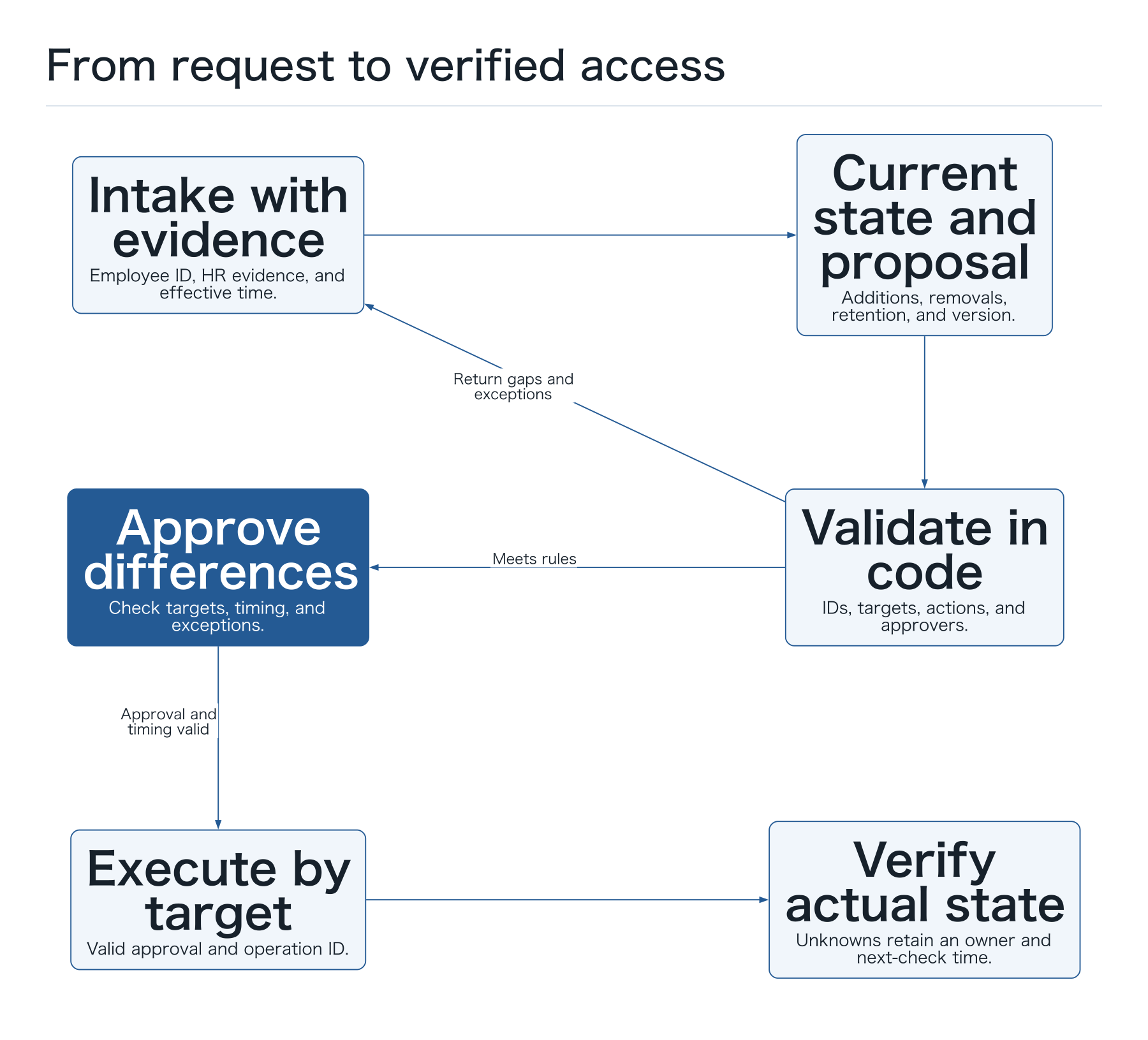
Use six stages from intake to completion
- Collect the request and its supporting evidence. Gather the employee ID, event type, effective date and time, and approved HR information. AI explains what is missing; it does not proceed as though it has filled in gaps in an incomplete request.
- Show the current state alongside the proposed change. Read the target SaaS application's current permissions and separate additions, removals, and permissions to retain. Record the applicable template and its version in the plan.
- Validate the plan with ordinary code. Check matching IDs, target applications, permitted operations, target counts, and required approvers. Send combinations outside company rules to an exception queue.
- Have a person approve the differences. Show the target, before-and-after state, execution time, exceptions, and expiration on one worksheet. Require a new approval if the target or template version changes after approval.
- Execute from a queue organized by target. Pass only tasks whose approvals remain valid and whose effective time has arrived to a restricted tool. Give each operation an ID and check for duplicate requests and canceled scheduled tasks.
- Verify the actual state before closing. Record the changed state through a fresh read or another verification method defined for that SaaS application. Leave anything unverified open with an assigned person and a next-check time.
The queue and register are business records maintained outside the conversation. Closing a chat must not erase the removal of temporary access or unverified tasks. Rather than assuming ADK conversation state alone can manage schedules and approvals, choose a storage mechanism that lets the process trace the same target and plan version after a restart.
 Open full-size diagram
Break a hypothetical transfer into additions, removals, and temporary exceptions
Assume that one of Case Company A's three salespeople transfers to purchasing at 09:00 Japan time on December 21, 2026. The owner of HR information has confirmed the transfer, and the SaaS owners have reviewed the proposed changes. The plan contains three target-specific tasks: add general staff access in the purchasing system, remove CRM editing access, and retain company-wide email access.
If CRM viewing access needs to remain until 18:00 Japan time on December 28 for handover work, approve it as a separate temporary exception. Record its reason, permitted scope, owner, and end time, and register the removal task in the queue before the deadline arrives. AI must not extend the deadline because it concludes that “the handover seems to be ongoing.” An extension requires a new approval from the owner.
On the transfer date, if purchasing access has been verified but CRM removal remains unverified, tell the employee, “Purchasing is available; the CRM change is being verified.” Avoid summarizing the situation as “transfer completed.” Include the check that company-wide email access has been retained, and show what is finished, what remains, and who will check next.
Use different completion conditions for joining and leaving
Joining: can the employee do the work needed on day one?
A joining plan brings together identity verification, the start date and time, required SaaS applications, licenses, and role templates. Follow company rules to determine separately when preparation can begin and when access can become active. If a license is unavailable, do not have AI remove another employee's access to free up a seat. Return purchasing or allocation decisions to the owner.
Do not mark the task complete merely because an account exists in an administration screen. Use the agreed method to verify that the permitted access is usable. Do not ask the employee to paste secrets into chat; collect only the verification result. Separate checks for being able to read department-wide material and being unable to read other departments' material, so that missing access and excessive access can be examined together.
Leaving: separate access revocation from business handover
For a departure, use the confirmed end date and time and the identified employee as the basis for checking, application by application, which actions stop sign-in or sessions. Do not assume account disabling, permission removal, and session revocation are the same operation. List in advance what can be handled through an API and what requires manual work.
Changing ownership of shared files and business records is a separate task from revoking access. Do not design AI to delete records or accounts in bulk simply because an employee is leaving. The company's responsible owners decide retention, deletion, and handover destinations. If the employee was involved with integration keys or shared accounts and their uses are unclear, return the issue to someone who can investigate the impact of stopping them.
If a departure is canceled, stop old removal schedules and obtain fresh approval for how to restore any access already revoked. Do not restore all previous permissions based only on a single status field changing back to “employed.” This is why the change history matters.
Separate API acceptance from verified access changes
Google Cloud IAM's official documentation describes delays in access-change propagation and notes that old access may remain usable immediately after revocation. Google Cloud IAM access-change propagation
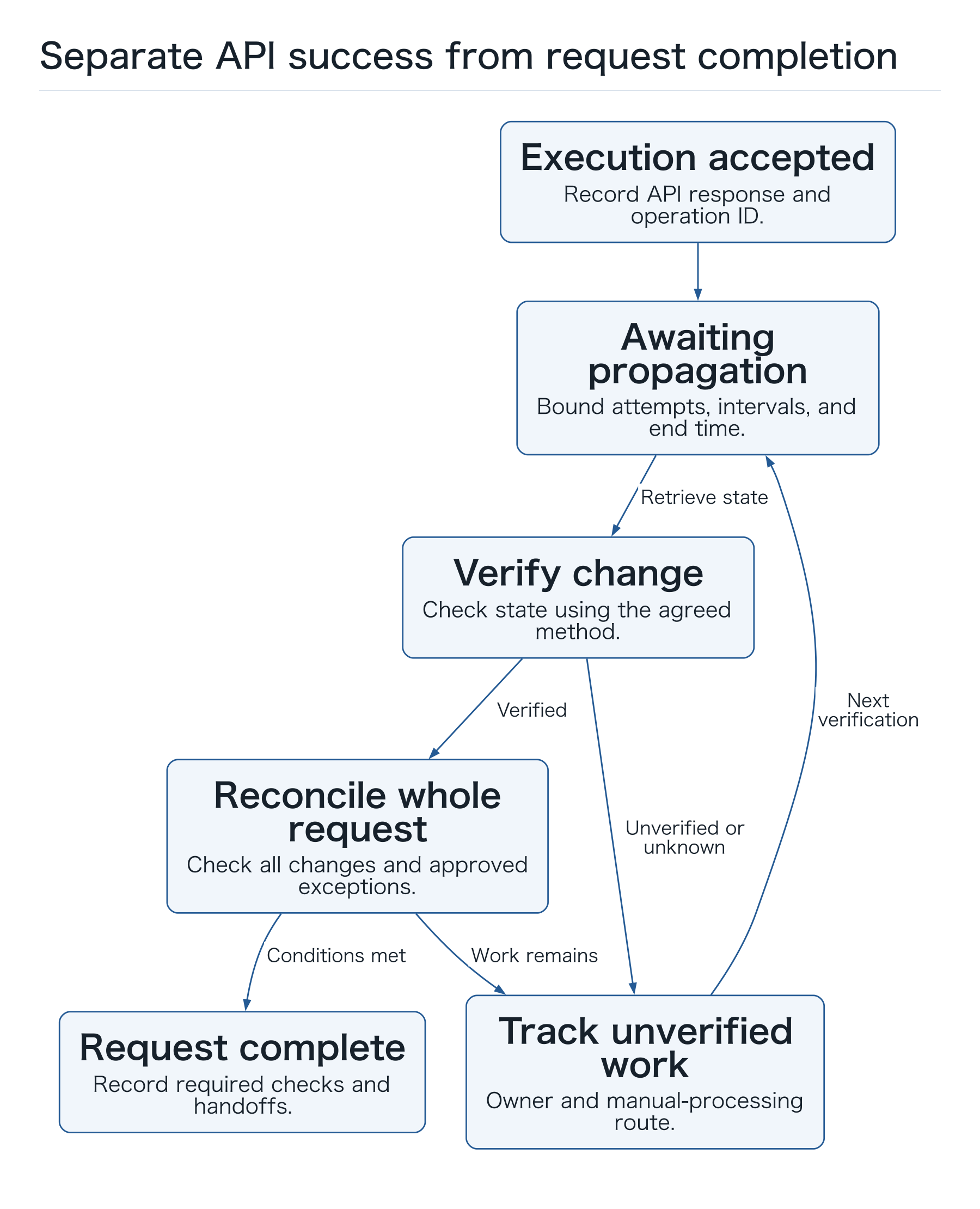
The timings in that explanation cannot be applied directly to other SaaS applications. Case Company A's proposed design distinguishes “execution accepted,” “awaiting propagation,” “verified,” and “unable to verify” for each target. When an API reports success, record its acceptance, then determine completion from the subsequent permission state or other agreed evidence an administrator can verify.
Set a retry count, interval, and end time for verification. If removal cannot be verified by its deadline, mark it as unable to verify, notify the owner, and return to the manual process. Do not keep querying indefinitely or display success while waiting for verification. Record waiting time separately from the time a person spends checking.
When a connection drops without a response, do not assume the change failed and send it again immediately. Check the operation ID and the target's current state, and hold the task if the outcome remains unknown. For an operation without duplicate prevention on the receiving side, do not claim that a pre-send comparison alone prevents duplicates. Include human investigation of an unknown result as a condition for further execution.
If changes succeed in only some SaaS applications, do not automatically assume that every change should be reversed. Restoration can create new excessive access. Compare the current state with the approved completion conditions and organize outstanding changes or corrections into a new plan. Do not allow the model to add whichever repair operation seems convenient.
 Open full-size diagram
Make one worksheet usable for handing over unfinished work
Prioritize a worksheet that the next responsible person can use directly over a conversational summary. Case Company A's trial brings the following fields together on one sheet.
- Identity and evidence: request ID, employee ID, internal IDs for each SaaS application, reference and version of HR information, and the owner who confirmed that information.
- Change plan: joining, transfer, or departure; effective date and time with time zone; template version; additions, removals, and retained access; and the paths through which permissions are granted.
- Approval and exceptions: approver ID, approval time, plan version, approval expiration, and the reason, owner, and end time of any temporary exception.
- Execution and verification: operation ID, executing identity, acceptance time, target system's response, verification method, actual state, and verification time.
- Remaining work: reason for incompletion, assigned person, next-check time, manual procedure, and IDs of related cancellation or correction requests.
Display the necessary differences and evidence on the approval worksheet without showing other employees' information in bulk. Likewise, limit employee notifications to available access and unfinished items. The owner decides who may read the stored records and how long to retain them, in line with the company's existing management policies.
Use consistent denominators to measure completion
Suppose a trial period has 10 requests, each with three target-specific changes, for a total of 30 changes. Twenty-seven have been verified. The remaining three are unverified changes belonging to three different requests. In this example, the change-level verification rate is 27 ÷ 30 = 90%, while the share of requests with all changes completed is 7 ÷ 10 = 70%. Using the single figure of 90% to describe request completion as healthy would obscure the actual situation.
Metric: Change verification rate
Numerator and denominator: Verified changes ÷ all changes in scope
Information to keep alongside it: Breakdown of unverified, held, and failed changes
Metric: Request completion rate
Numerator and denominator: Completed requests with all changes verified and exceptions handed over ÷ eligible requests received
Information to keep alongside it: Show canceled requests separately and fix how they are treated in the denominator
Metric: Revocation verified by deadline
Numerator and denominator: Targets whose revocation was verified by the deadline ÷ targets whose revocation deadline fell within the period
Information to keep alongside it: Keep unverified targets in the denominator and record delay duration
Metric: Executions outside approval
Numerator and denominator: Number of operations executed outside approval, alongside all executed operations
Information to keep alongside it: Record counts, targets, and causes, as well as any rate
“Revocation verified” means that the agreed revocation condition has been checked, not that a cancellation API accepted the request. Do not exclude applications that cannot be verified and present the resulting figure as a company-wide achievement rate. Separate joining, transfer, and departure volumes, too, so a high success rate for new hires does not conceal delays in departure handling.
For time, separate the hands-on time people spend on intake, approval, verification, and exceptions from elapsed time that includes approval and propagation waits. Include maintenance and register corrections, and compare the same scope before and during the trial. Do not promise a reduction rate in advance. When volumes are small, report counts and the circumstances of individual cases alongside the metrics.
Begin the trial with reading and drafting change plans
Choose one SaaS application, one role template, and one ordinary transfer pattern first. Prepare past requests using only the information needed, have the agent draft plans without making actual changes, and compare them with reference plans prepared by people. Evaluate the target employee, permission differences, effective time, and reasons for holding a task. Do not pass the trial solely because the explanations read naturally.
Include tests for identical names, old email addresses, canceled transfers, unavailable approvers, duplicate requests, unknown responses, partial success, and expired approvals. The expected behavior is to hold and return work to a person when appropriate. Even if a document says “grant administrator access,” verify that it cannot become an execution candidate without passing the fixed rules and approval checks.
Before moving to a change-execution trial, verify authentication, restricted permissions, propagation checks, and stopping procedures in the target application's test environment or an equivalent setting. If no test environment is available, keep the agent's scope at drafting plans while a person makes changes in the existing administration interface; the value can still be measured. Make the ability for IT to stop execution and hand work to the manual process a condition for starting.
The first useful artifact is a worksheet that links one request to the correct employee and tracks approved changes and unfinished work, rather than a universal agent that controls every SaaS application. With those records in place, first-day access problems, permissions left after transfers, and missed departure checks can each be managed as tasks with an assigned owner.
Three checks before practice
- Are employee and SaaS identities reliably mapped?
- Can removal of temporary exceptions be tracked with an owner?
- Does request completion exclude outstanding unverified changes?