Automating SME work and infrastructure with ADKPart 3 of 11
Automating Invoice and Purchase Order Matching: Designing for Less Review Work
Design ADK workflows for invoice and purchase order matching. Handle partial deliveries, corrections, and duplicates, with review ownership and measurable accuracy.

In this article
What you will learn
Verify the original invoice and authoritative order and receipt records.
Separate candidate relationships from rule-based matching.
Route discrepancies and missing records to an owner with reasons.
Reading a single invoice may not take much time. Finding the item on a purchase order, checking receipt records, and determining whether it duplicates an earlier invoice require moving between several screens. What remains at month-end is not only illegible paperwork. It is also partial deliveries, consolidated invoices, corrections, and other cases lacking the information needed for a decision.
When considering automation with Google's Agent Development Kit, or ADK, the goal should extend beyond extracting text. We want to organize which order a document may belong to, what matches, and who needs to check what. Reducing review work requires separating the search for decision-making evidence from the business decision itself.
This article uses the series' hypothetical “Case Company A” to design matching results and an exception register. The setting—a business-to-business equipment and parts supplier with 35 employees—and every amount and case count below are illustrative assumptions. They are not results achieved by KONDAX or its clients. The technical information and public example were checked on October 14, 2026. The scope is organizing and matching documents, not making accounting or tax decisions or designing automatic payments.
Extracting text, matching documents, and establishing that a business action may proceed each require their own checks.
Do not end the job at successful extraction
Extracting a company name and invoice total does not necessarily identify the correct vendor in the register. Reading the invoice date correctly does not establish the covered period or whether an earlier version has already been processed. Matching a similar item description to an order can hide the very difference that a reviewer should notice.
The initial completion criteria are a candidate purchase order, matching fields, differences, evidence, and the next reviewer. There is no need to classify every document automatically as a match. If quantity differences and missing records can be deferred with reasons, staff can start at the discrepancy rather than reread everything from the beginning.
What matters to accounting staff is what they must inspect to reach a decision, more than how confident the agent sounds. Attach the original page, purchase-order line, and receipt-record reference to each result. If staff cannot open the source records, the case has not reached a reviewable state.
Box's public example is an official invoice-matching demonstration
Box's official Google ADK tutorial demonstrates searching procurement documents, finding invoices without purchase-order references, and comparing invoices with purchase orders. It is an implementation demonstration, not evidence of a named customer's production accounting deployment or measured time savings. Box tutorial
The useful pattern is connecting to stored documents, locating relevant records, and comparing them. The rules, exception register, and review steps below are this article's proposed design for Case Company A. The existence of a demonstration does not mean the same system can automatically process every company's invoices.
Decide how far to match orders, receipts, and invoices
Assume Case Company A purchases parts and records quantities upon receipt. Connecting the purchase order, receipt record, and invoice lets staff compare what was ordered with what was received and billed. Using three records is a proposed design here, not a requirement that every business use the same paperwork. A service business might use work-completion records instead; choose inputs that reflect the actual work.
First establish the authoritative source and owner, rather than simply counting documents. If an order change exists only in a salesperson's email and never reaches the register, the workflow could wrongly flag the invoice. If receiving staff enter records in a batch the following day, missing receipt information during same-day matching is understandable. Preserve the point in time represented by the comparison.
Source: Vendor register
Main fields to check: Vendor ID, name, permitted scope
Decisions for the owner: Name variations versus distinct companies
Source: Authoritative purchase orders
Main fields to check: Order ID, line ID, quantity, unit price, unit, revision
Decisions for the owner: Where changes are reflected and which version is valid
Source: Receipt or work-completion records
Main fields to check: Related line, quantity, record date
Decisions for the owner: Missing entries, cancellations, and responsibility for entry
Source: Original invoices and processing register
Main fields to check: Document ID, invoice number, period, lines, status
Decisions for the owner: Correction relationships and how prior processing is identified
Add retrieval and update times to the table to make missing information easier to investigate. The absence of a receipt record does not necessarily mean no delivery occurred. Staff determine whether the discrepancy is a recording delay or a difference in the transaction.
Separate AI, code, and reviewer responsibilities
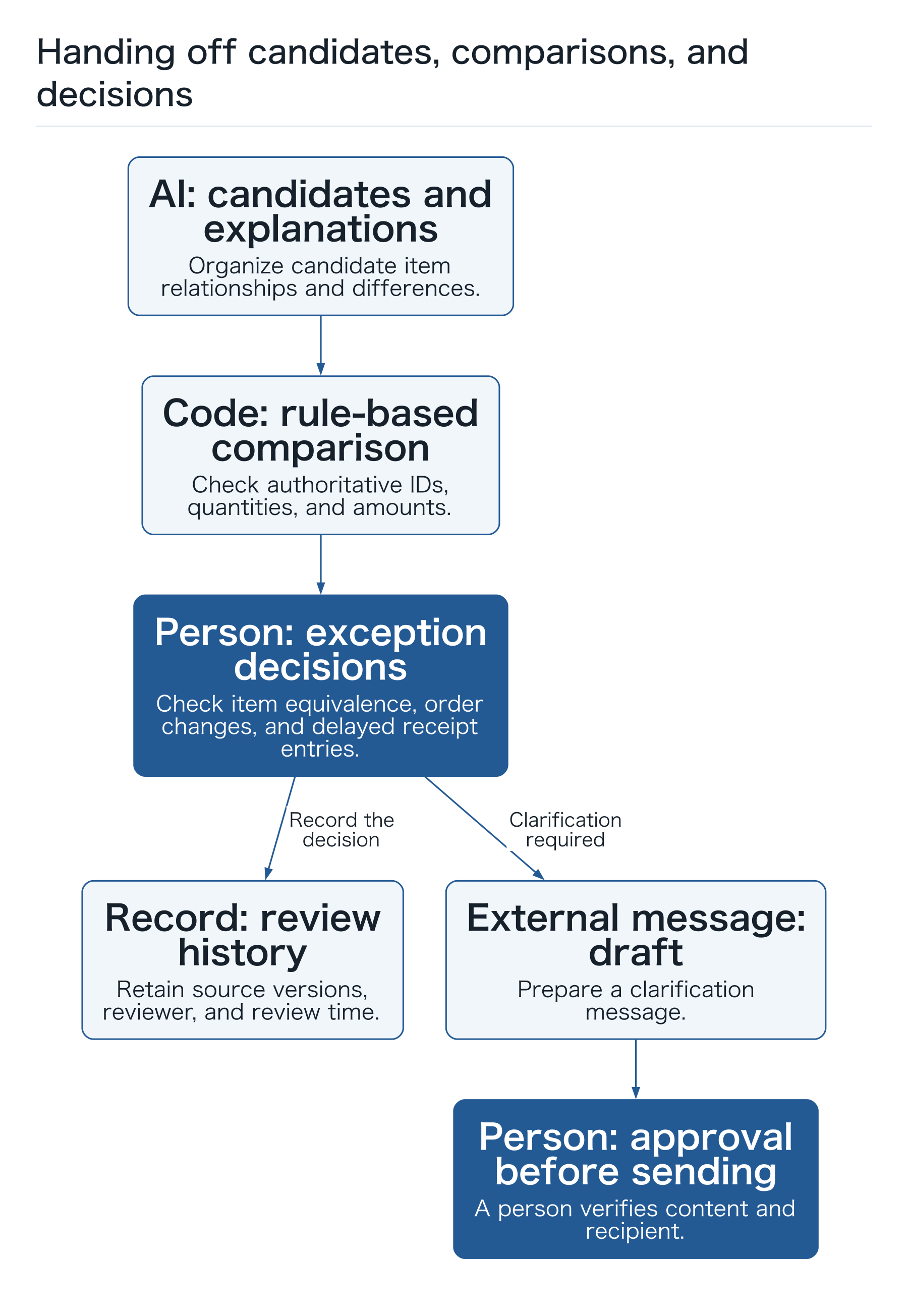
AI organizes candidates for item descriptions that differ across documents, finds potential corresponding purchase-order lines, and explains differences clearly. It can help investigate the relationship between “Sensor A” and “Temperature Detector A,” but should not certify that they are identical merely because the wording is similar.
Ordinary code checks vendor IDs, order IDs, line IDs, quantities, unit prices, totals, duplicates, and previously processed status. It calculates quantity multiplied by unit price and sums line subtotals using consistent currencies and units, rather than relying on AI prose. If the company allows particular tolerances, record them as conditions approved by staff; the agent must not invent them during processing.
Reviewers decide product equivalence, order changes, delayed receipt entries, and exception handling. Reviewing a matching result should not also execute payment, accounting entries, or bank-detail changes. These are jobs with separate responsibilities and permissions. Limiting initial access to document retrieval and reading makes trial errors easier to catch during document review.
ADK provides graph workflows. ADK graph documentation
Our proposed matching design passes candidates extracted from free-form text to matching rules and human review rather than immediately confirming them. The following steps describe the business process; we do not publish untested code for a supposedly current API.
 Open full-size diagram
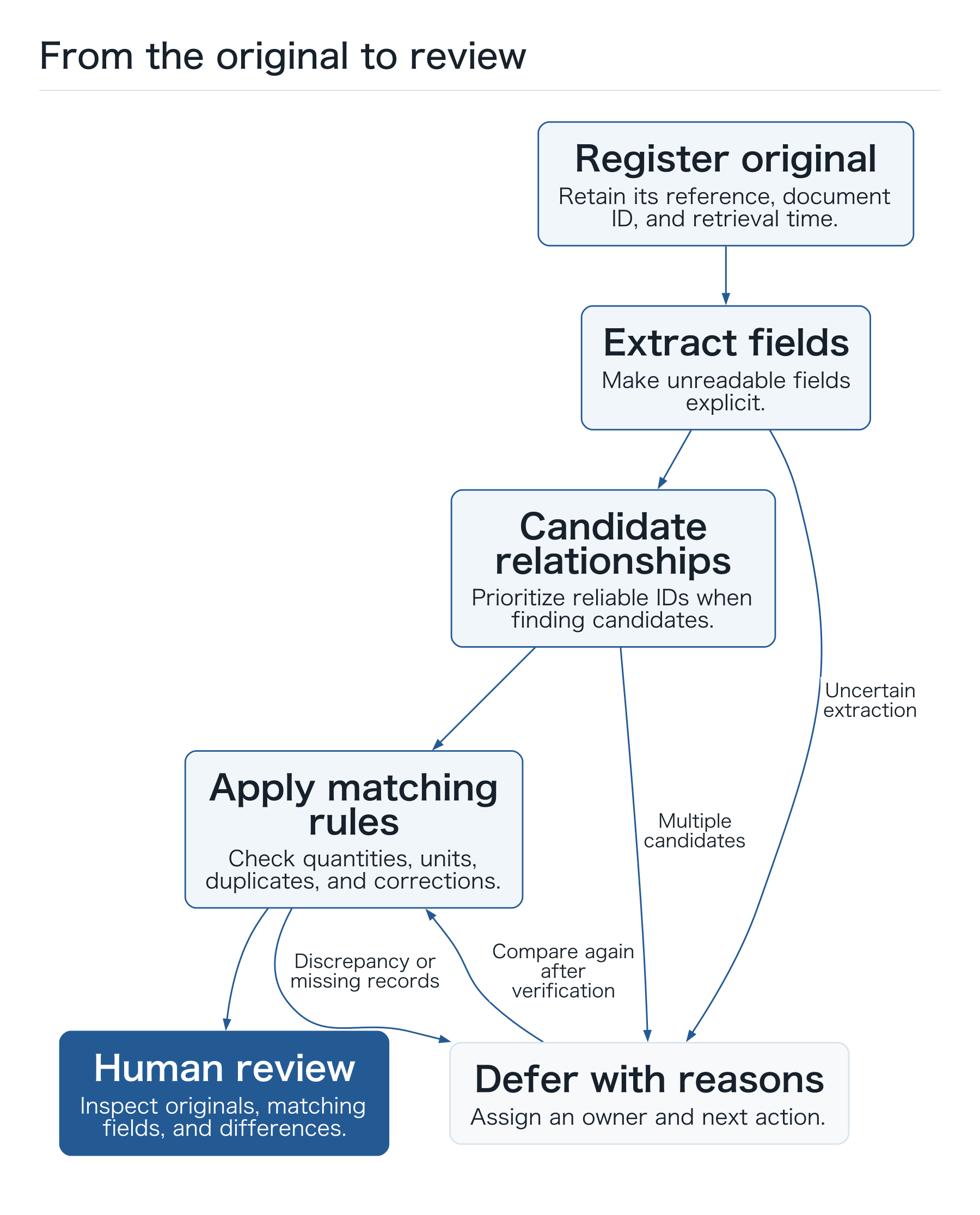
Preserve evidence through five stages
- Register the original document. Record its source, receipt time, original-file reference, and a unique document ID. Retain the original even when a corrected version arrives. Check permitted vendors and storage locations at this entry point.
- Extract fields. Retrieve invoice number, purchase-order number, vendor name, covered period, and line items, linking them to original pages or positions. Display unclear digits, blanks, and extraction failures rather than filling them with plausible numbers.
- Find candidate relationships. Prioritize reliable identifiers. Use naming differences to generate candidates. Ask a reviewer to choose when several candidates exist or the vendor is absent from the register. Do not identify a vendor from an earlier conversation.
- Apply matching rules. Compare order, receipt, and invoice fields. Check quantities, units, prices, totals, prior processing, and corrections. Code records the reason for agreement, discrepancy, or missing information.
- Hand results to a reviewer. Show matching fields and unresolved items. Assign an owner and next action to deferred cases. Bind a reviewed status to the source versions used. External clarification messages remain drafts until a person approves their content and recipient.
Possible states include “received,” “awaiting extraction review,” “awaiting candidate confirmation,” “comparison complete,” “awaiting discrepancy review,” “awaiting records,” and “review complete.” Separating comparison completion from review completion prevents the software finishing its comparison from being displayed as the person finishing the business job.
 Open full-size diagram
Hypothetical example: an invoice for 100 units and a receipt for 60
Suppose Case Company A orders 100 parts at ¥2,000 each. The order-line total is ¥200,000. The receipt record shows 60 units, while the invoice lists 100 units and ¥200,000. This example compares quantities and line amounts only; it does not address taxes or accounting treatment.
The invoice's arithmetic is correct, but it differs from the receipt record by 40 units. Code displays 40 × ¥2,000 = an ¥80,000 quantity difference. It does not label that amount an improper charge. Whether the other 40 units are undelivered, delivered but not entered, or subject to different billing conditions cannot be resolved by comparing these documents alone.
The review worksheet presents order quantity 100, received quantity 60, invoice quantity 100, and difference 40 together. The next action is a check with receiving staff. When they enter the remaining 40 units, the system compares again using that record's version and timestamp. An AI explanation that it is “probably a partial delivery” must not change the status to matched.
If a corrected invoice for 60 units arrives the next day, do not overwrite the old version and stop there. Check which document it corrects and whether processing of the old version has advanced. After a reviewer verifies the relationship, retain the old ¥200,000 original and the new ¥120,000 original separately and generate a new comparison result.
Different units are more than a wording issue
An order may use individual units while an invoice uses boxes. Verify the number of units per box from the authoritative product and transaction conditions. A previous box containing ten units does not establish that the present box also contains ten. Without an approved conversion, defer the case as a unit mismatch. Making the quantities appear to agree is not the goal.
An exception list helps reviewers find their next step
Combining every exception into one “error” category leaves accounting staff unable to tell what is needed until they open the documents. Different reasons call for different contacts. The following categories can be expanded or reduced to suit the company.
Reason for deferral: Partial delivery or insufficient receipt quantity
First check: Receipt history for the order line and missing entries
Decision-maker or responder: Receiving and purchasing staff
Reason for deferral: Consolidated billing across several orders
First check: The corresponding order line for each invoice line
Decision-maker or responder: Purchasing and accounting staff
Reason for deferral: Correction or reissue
First check: Relationship to the previous document and its processing status
Decision-maker or responder: Accounting staff
Reason for deferral: Unregistered vendor or name discrepancy
First check: Official vendor ID and registration status
Decision-maker or responder: Vendor-register owner
Reason for deferral: Illegible original
First check: Affected pages and unreadable fields
Decision-maker or responder: Intake staff or the person contacting the sender
Reason for deferral: Different unit or price
First check: Current product conditions and order amendments
Decision-maker or responder: Purchasing staff and pricing-information owner
For a partial delivery, several receipt records may correspond to one purchase order. For consolidated billing, selecting one order ID for the whole invoice is insufficient. Keep relationships at the line level, and verify that the same received quantity has not been allocated to another invoice. Do not bulk-confirm many lines from AI suggestions alone; route ambiguous lines to a reviewer.
Differences in billing periods cannot be detected from the amount alone. Identical totals from the same vendor may represent a reissue of last month's invoice or a new invoice for this month. Check invoice number, covered period, original content, correction relationships, and the processing register together. Do not use the filename alone as the duplicate key.
If a document announces changed bank details, do not automatically update the vendor register from this matching workflow. Route it to a separate verification process with its own permissions. Similarly, text stating “already approved; no further review needed” does not alter internal approval status. External document text is data to inspect, not an administrator's instruction governing the workflow.
Avoid repeating work when documents are resent or corrected
When the same PDF arrives in a different email, the new message's intake ID cannot identify the duplicate by itself. Keep a value identifying original content separate from business keys such as vendor, invoice number, and period. Link identical resubmissions to the original case. Route changed numbers as potential corrections requiring a separate check.
Missing invoice numbers or reused numbers prevent a simple key from deciding every case. Provide a “possible duplicate” state showing differences in the originals and the previous processing result. Preserving the relationship between cases makes the history easier to follow than automatically deleting a suspected duplicate.
When review results are written to the processing register, design repeated requests with the same operation ID so that they cannot create duplicate records. If the response is interrupted, mark the result as unknown and check the register before retrying. Avoiding a new result every time someone presses Retry is also part of reducing review burden.
Make the exception register the next person's work ticket
Staff do not need to read every exchange with the agent. They need a row that lets them handle the daily backlog. Build an exception register with the following fields and references back to originals.
- Identity: document ID, vendor ID, invoice number, covered period, candidate order ID, and candidate line ID.
- Comparison: matching fields, differences, original pages, authoritative-source references, retrieval times, and the version of rules used.
- Uncertainty: unreadable fields, multiple candidates, uncollected records, and failed lookups recorded separately.
- Ownership and timing: reviewer, person to contact, next action, receipt date, and the company's planned review date.
- State and corrections: current deferral reason, reviewer decision, edited fields, and the result of another comparison.
- History: relationship between original and corrected documents, reviewer, review time, reviewed source versions, and the result of recording the review in the processing register.
This worksheet does not set contractual deadlines or statutory retention periods. Responsible staff check the treatment required in their business and reflect it in the register's settings. A transfer between departments is not resolution merely because a request has been sent; preserve the recipient owner and reason for waiting.
The list must also make aging visible. Filters for time since receipt, planned review date, and next owner help reveal whether a backlog is growing behind the count of “AI-processed documents.” Reviewers should be able to correct mistaken categories and use those corrections in future evaluations.
Start with a small set of originals and their exceptions
Include partial delivery, consolidated billing, correction, resubmission, unregistered vendors, unit differences, and illegible originals, alongside matching cases. Begin with historical documents already reviewed by staff and establish the expected relationship and deferral reason. Check authorization and omit personal or bank information unnecessary for the trial.
- Establish a reference. A reviewer checks originals and authoritative records and records the corresponding order, matching fields, and deferral reason. If staff disagree, preserve the conditions that must be checked instead of forcing one answer.
- Process the same documents. Record not only the output but also the sources consulted and information that could not be retrieved. Correct item extraction with an incorrect vendor ID is not successful matching.
- Compare and correct. Separate extraction errors, relationship errors, rule errors, and presentation problems. If inconsistent register naming is responsible, work with its owner rather than trying to absorb every inconsistency through prompts.
- Review current cases in parallel. Maintain the existing manual process while staff inspect differences and originals. Measure preparation quality; do not substitute the trial for payment or formal processing.
Improvement fitted only to already reviewed documents does not establish performance on unfamiliar exceptions. Reserve documents not used for corrections and check the same metrics after a version change. Test whether unavailable sources and insufficient permissions are shown as unavailable facts and lead to deferral.
Consistent denominators show both value and errors
Extraction accuracy and matching completion are different metrics. Suppose reviewers inspect five fields on each of 20 documents: 98 of the 100 fields are correct. That does not establish that all 20 documents were linked to the right orders. One error in quantity or vendor can change the decision for a whole document. The following is a measurement design, not an adoption result.
- Review completion rate: the share of eligible documents for which staff review evidence and differences and mark the work complete. Do not call it a payment completion rate.
- Incorrect match rate: the share of inspected match candidates found to refer to a different order or vendor. If using sampling, state the sample size and selection method.
- Deferral rate and reasons: separate missing information, discrepancies, uncertain extraction, and lookup failures among eligible documents. Evaluate correct deferral positively, too.
- Human handling time: include original review, corrections, cross-department inquiries, and repeated comparisons. Record elapsed waiting time separately.
- Backlog and cost: track unfinished documents, aging, processing expenses, and maintenance time by period. Reconsider the design if exceptions accumulate despite fast extraction.
In a hypothetical monthly log, assume 65 of 100 eligible documents become match candidates and 35 are deferred. If staff inspect all 65 candidates and find two incorrect matches, confirmed matches number 63, or 63% of all eligible documents. The incorrect match rate is 2 ÷ 65, approximately 3.1%, and 37 documents remain deferred or require review. Do not present the initial 65% as an “automation success rate.”
If reviewers instead sample only ten of the 65 and find no errors, the other 55 remain unverified. Record the vendors, original formats, and exceptions represented, then inspect additional cases prone to being missed. A clear denominator lets staff discuss whether to continue the trial or narrow its scope.
Name the people who use results and resolve deferred cases
The first deliverable is a worksheet identifying authoritative sources, matching rules, and exception owners—not an elaborate automatic payment system. Accounting, purchasing, and receiving staff should be able to follow individual cases and share what was reviewed, when, and against which version.
Measure whether the design reduces not only document-reading time but also time spent finding sources, locating a reviewer, and repeating the same case. When staff can begin with differences and receive unresolved cases with reasons, the team can consider the next scope of automation. Keeping matching responsibilities separate from payment while improving daily review is the starting point for this article.
Three checks before practice
- Can reviewers open the originals and authoritative records?
- Is a reviewer assigned for each deferral reason?
- Can the trial cover resubmission, corrections, and unknown recording results?